
Compute instances
Overview
This page displays all the VMs in the security group. You can add more instances from other existing security groups with VMs already attached to them. The user can synchronize all VMs as well using the SYNCHRONIZE ALL button.
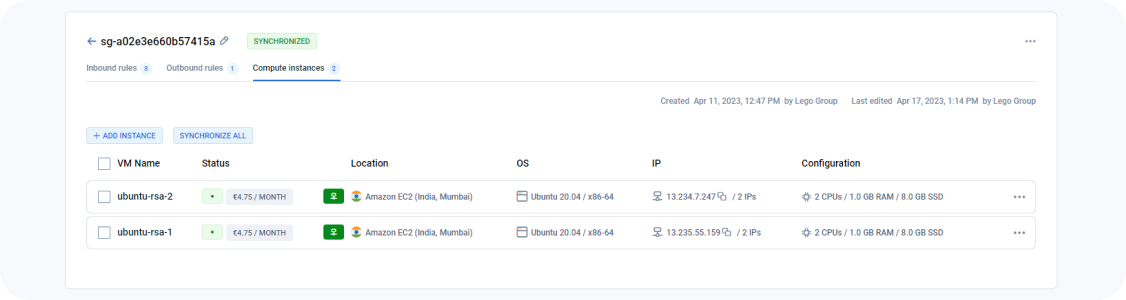
Actions you can perform on this page
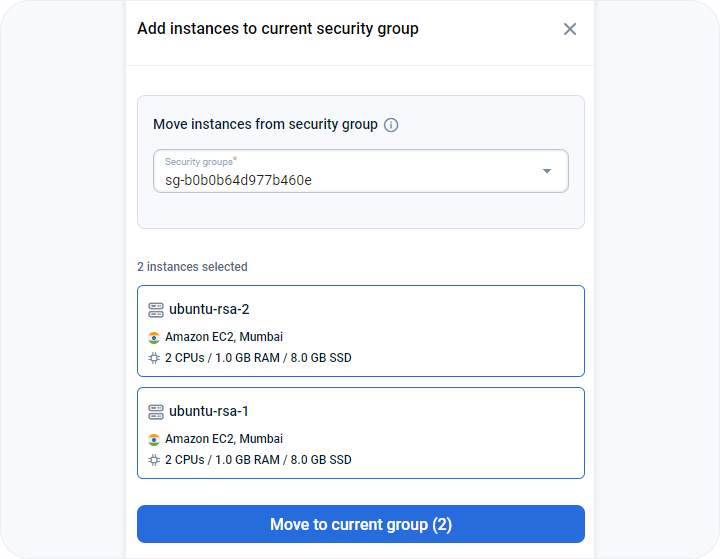
How can I move instances from one security group to another? - FAQ
If there are no VMs in the security group you will see a button to + ADD INSTANCE. If you click on this button a sidebar opens up on the right. You can select the VM(s) you want to move and then click the MOVE TO THE CURRENT GROUP button.
How to synchronize all VMs? - FAQ
Page navigation — Click on “All Projects“ and navigate to your project. You will be, by default on the project summary link in the left sidebar. Click on the “Networks” link in the sidebar on the left.
You can click on the SYNCHRONIZE ALL button to synchronize all the security groups. Clicking on this button triggers a process that synchronizes all the changes made to the inbound and outbound rules of a security group across all the instances associated with that security group.
For example, let's say you have a security group named "web-server-group" that is associated with several web servers in your cloud environment. If you make changes to the inbound rules of this security group by adding a new rule that allows HTTP traffic, clicking on the "synchronize all" button will ensure that this new rule is applied to all the web servers associated with the "web-server-group" security group.
Essentially, the "synchronize all" button ensures that any changes made to the security group are propagated uniformly across all the instances associated with that security group. This helps maintain the consistency and integrity of the security settings in the cloud environment, ensuring that network traffic is properly managed and secured.
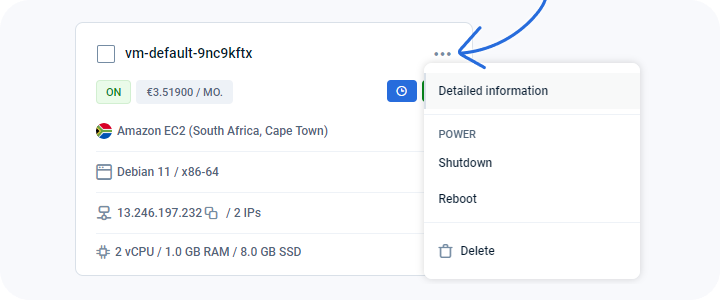
VM dropdown menu
Users can perform many of the options available for managing VMs. These actions are covered in detail in the VMs service section.
Last updated on 1 Aug 2026