
Security groups
Overview
Users can search and open any security groups. They can also add new security groups.
What is a security group? - FAQ
A security group, in the context of computer networking and information security, refers to a set of rules that determine what network traffic is allowed to enter or leave a particular network or system. It acts as a virtual firewall, controlling inbound and outbound traffic based on predefined rules.
Security groups are commonly used in all cloud computing environments to manage the security of virtual machines (VMs) and other cloud resources. In these environments, security groups are used to define the traffic that is allowed to flow between different resources within the same virtual network or between different virtual networks.
Overall, security groups play a critical role in securing cloud resources by providing network-level access control, protecting against unauthorized access, and helping to prevent security breaches.
In the emma platform, all the security groups are multi-cloud in nature.
What are inbound and outbound rules in a security group? - FAQ
In a security group, inbound and outbound rules are used to control the traffic that is allowed to enter or leave the instances associated with that security group.
Inbound rules define the traffic that is allowed to reach the instances associated with the security group. For example, you might create an inbound rule that allows traffic on port 80 (HTTP) from any IP address, in order to allow web traffic to reach your instances. You can also create more specific rules that allow traffic only from specific IP addresses or subnets.
Outbound rules, on the other hand, define the traffic that is allowed to leave the instances associated with the security group. For example, you might create an outbound rule that allows traffic on port 443 (HTTPS) to any IP address, in order to allow your instances to make outbound HTTPS connections to the internet. You can also create more specific rules that allow traffic only to specific IP addresses or subnets.
Together, inbound and outbound rules allow you to create a comprehensive security policy for your instances in a cloud computing environment. By carefully configuring these rules, you can ensure that your instances are accessible only to the intended users and systems and that they are protected from unauthorized access and malicious attacks.
Table report on the page
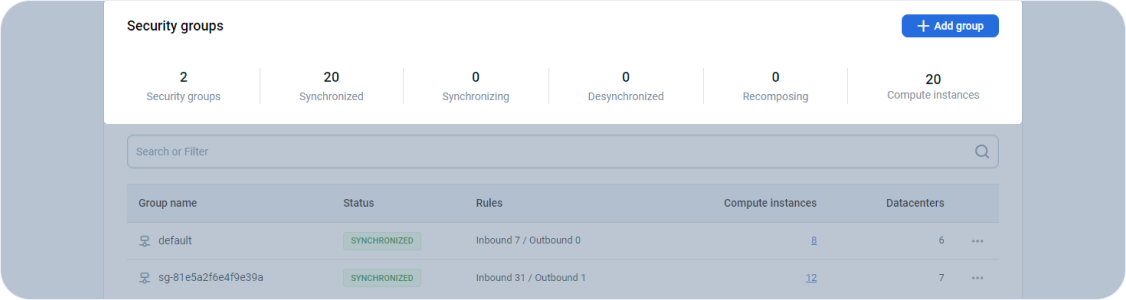
The first component on the page provides a summary of your project networks or security groups.
Page navigation — Click on “All Projects“ and navigate to your project. You will be, by default on the project summary link in the left sidebar. Click on the “Networks” link in the sidebar on the left.
What is synchronization? - FAQ
A security group is a combination of inbound and outbound rules as explained here → What are inbound and outbound rules in a security group?.
Let's take an example where VMs from different providers are in a single emma security group. When you make changes in the emma inbound and outbound rules and press synchronize the changes in the emma security group are propagated to the respective provider’s security groups. While this is happening, usually in seconds, the security groups have the status synchronizing. After it is done the status changes to synchronized.
Now let's say that another VM is added to the emma security group. As this will not be synchronized at first with the other VMs, therefore the status will be desynchronized. emma runs the synchronization process again with the new VM and this process is called recomposing. This process ensures that the changes made to the security group are applied uniformly to all the VMs within the group, maintaining the integrity and security of the environment.
Compute Instances
Provides the number of virtual machines currently deployed in the project using the project networks.
Due to current implementation, we recommend deploying no more than 35 GCP virtual machines within a single security group. If you need to include more virtual machines in the same security group, please contact our technical support using the Tech support widget
Actions you can perform on the page
You can launch the “Add group” page by clicking on the + ADD GROUP button.
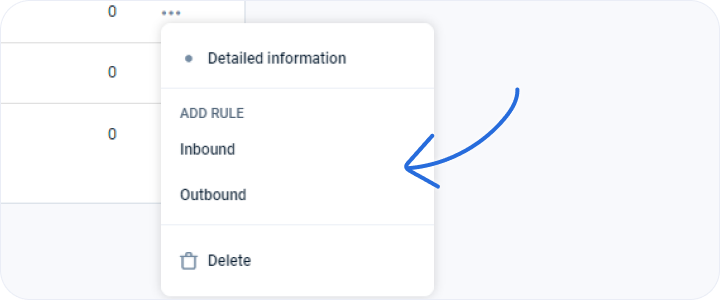
If you click on the ellipsis (…) at the end of the rows, you can launch pages to add inbound and outbound network rules. You can also delete the user-created security groups if there are no VMs attached to this security group.
Add group
Users can use this page to add inbound and outbound network rules in a security group.
Last updated on 1 Aug 2026