
My ProjectsProject Settings
Track quota requests
Overview
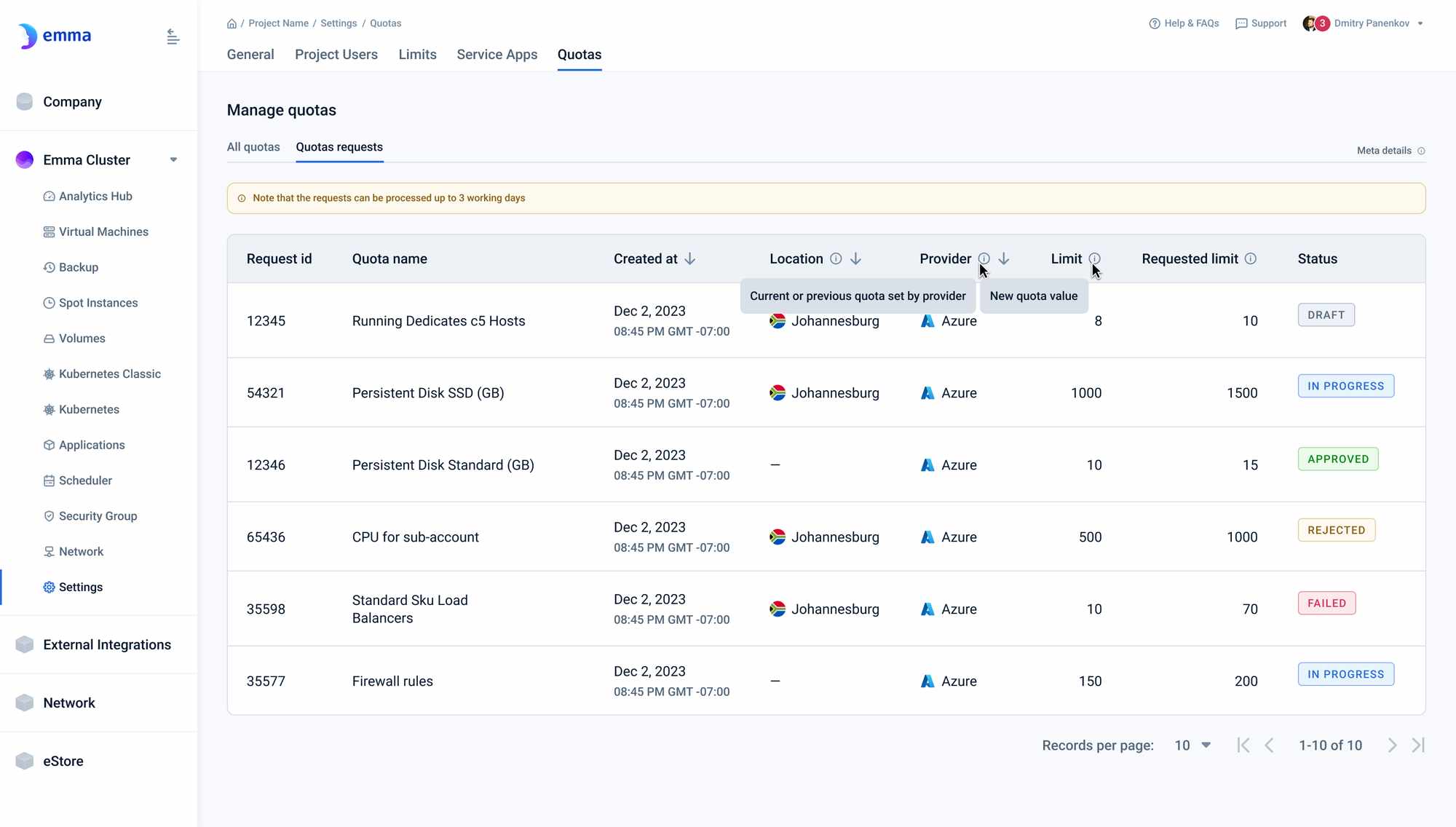
The quota requests page allows users to access a list of quotas requests that were created in emma and track their statuses. Users can sort the list by all displayed columns.
Page description
This page enables users to see all quotas, filtered and sorted.
Quotas requests table
Table with eight columns that displays a list of all quotas:
- Request id - Unique identifier of the request in emma
- Quota name: The name of the quota as defined by the provider.
- Created at: Date and time when the increase request was created
- Location: The geographical location where the quota is applied.
- Provider: The provider that set the quota.
- Limit: Current or previous quota set by the provider.
- Requested limit: New quota limit requested
- Status: Current state of the request, which can be one of the following: Draft - Request was created In progress - Request was sent to the provider, awaiting a response Approved - Request was approved by the provider, and the quota has been updated Rejected - The request was rejected by the provider. You can try again with a lower limit, or contact our tech support team for assistance Failed - Something went wrong. You can try to send the request again, or contact our tech support team for assistance.
Actions you can perform on this page
Sort table columns
Click on the arrow to the right of the column name to refresh and sort the table in ascending or descending order. By default, the table is sorted by the Created at field in descending order.
How is this guide?
Last updated on 1 Aug 2026