
Manage Security
View and manage SSH keys — generate and import keys with RSA and ED25519 encryption.
Overview
Users can use this page to view and manage SSH keys. They can also generate and import SSH keys of RSA and ED25519 encryption.
What is an SSH public-private key pair?
SSH keys are a type of security credential used to authenticate remote computers and enable secure, encrypted communication between them.
SSH stands for Secure Shell, a cryptographic network protocol that provides secure access to remote machines over an unsecured network. SSH keys are a pair of cryptographic keys, consisting of a public key and a private key, that are used to authenticate and authorize secure connections between two computers.
When a user tries to connect to a remote server using SSH, the server uses the public key to authenticate the user's identity, and the private key is used to decrypt the data exchanged during the connection. This way, SSH keys provide a more secure and efficient way to authenticate users and enable secure communication over the Internet.
Another way of thinking: an SSH key is an access credential in the SSH protocol. Its function is similar to that of user names and passwords, but the keys are primarily used for automated processes and for implementing single sign-on by system administrators and power users.
RSA vs ED25519 — which one to choose?
RSA is an older encryption algorithm that has been widely used for many years. It is based on the difficulty of factoring large prime numbers and uses a key length of at least 2048 bits to provide strong security. ED25519 is a relatively new encryption algorithm based on elliptic curve cryptography — a shorter key length of only 256 bits makes it faster and more efficient than RSA.
| RSA | ED25519 | |
|---|---|---|
| Pros | Widely supported · Secure and reliable · Key length can be adjusted for greater security | Efficient and fast · Stronger security than RSA · Shorter key length for faster processing |
| Cons | Slower than ED25519 · Longer key lengths may slow down connections · Potential vulnerability to certain attacks | Less widely supported · Key length cannot be adjusted |
The above table is not an exhaustive list of the pros and cons of each encryption method. If you're not sure which encryption method to choose, go with the default option provided by your SSH client or server, or consult a security expert.
Where can I find all my SSH keys?
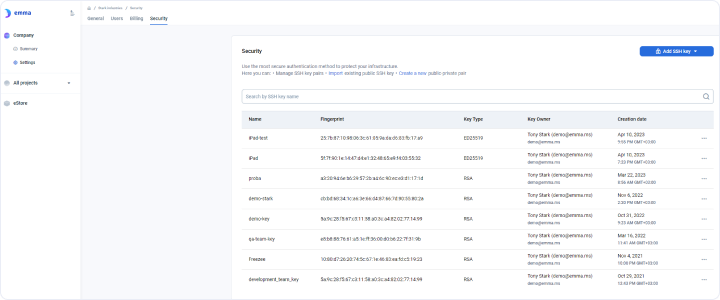
Page navigation — click Company → Settings → Security.
The table shows the list of the company-managed keys on the emma platform. Columns are:
- Name — SSH key name, for example
SKGAppFlexFunctionalityEDKeyPair - Fingerprint — unique identifier text for keys, for example
da:78:9e:56:9f:39:57:da:8d:78:f4:57:91:d6:22:c2 - Key Type — the type of encryption used for SSH keys:
RSAorED25519 - Key Owner — the user who generated or imported the key, e.g. "Joe Smith". This column also shows the email of the user
- Creation date — the key creation date and time, for example "Apr 10, 2023: 11:28 AM GMT+05:30"
How do I import an SSH key?
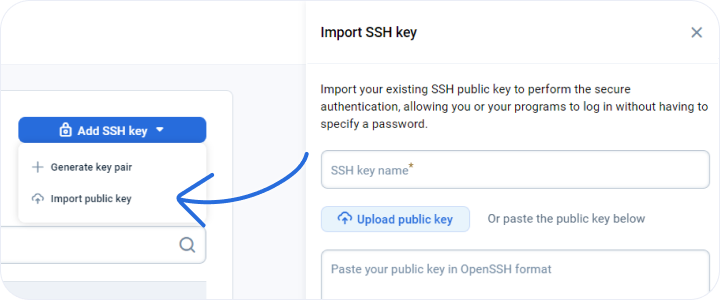
Page navigation — click Company → Settings → Security → ADD SSH KEY → Import public key.
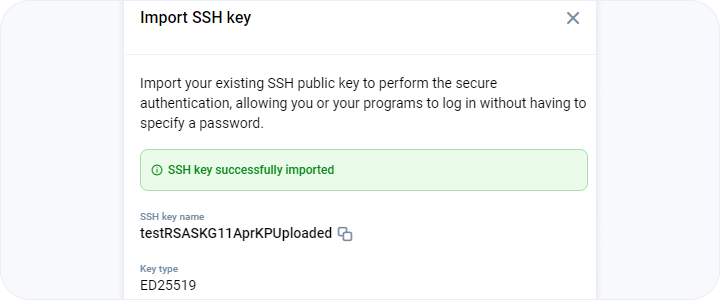
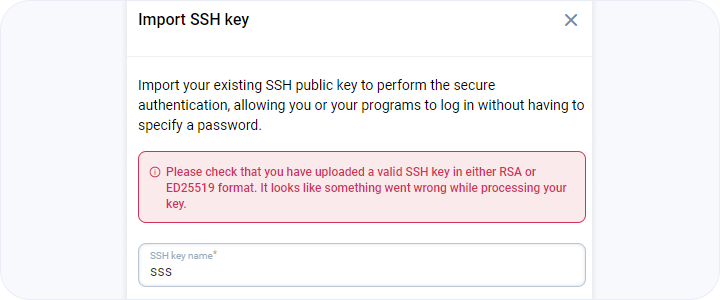
You can add a name for the SSH key — choose a meaningful name like KPAndroidKubernetesED. The next step is to upload the public key, or you can paste it.
Example for an RSA public key:
ssh-rsa AAAAB3NzaC1yc2EAAAADAQABAAABAQC5onTqQyMbGoiMjwMJf2qzGIbFaK7sT0tl9lXfelEcwP8tFQ7C3Mcdz3MydMPpQlBWlC7U6/KDCpo6JYptdUAGLp+fLEdznjgHJODu4dL0X6iXu8Hcbarc7aXtoJ5EfZiAghoiM5gkSRwBE3pmmQW0HcM5UlRET3SlvIvCDer26uqmKl/QfRpbfXfxVZkIQmTUXqtJpMRwjF+bnGWQCaqSYTxYpcDxT8kLoKliD6lqRvfwMnYjkHiGY8Gmke6UnMgBUphqkEClKvjZ/FkZh9mokOaGVe4ql3rnfbBnVlhYCg5ZkGygLqbBT8iRCZAfaQSd+DnM9HLV+bympE8gGrrX AMAZON_EC2Example for an ED25519 public key:
ssh-ed25519 AAAAC3NzaC1lZDI1NTE5AAAAIGWBjLC6gq8pB1WwUjOxqXoiSm+jzzs1PfwwCf/UJviL username email@localhostIn case you do not want to generate keys using the emma platform and want to generate them on your own, follow the instructions provided at the bottom of the Import SSH key sidebar ("Show Instruction — How to create the SSH key pair"):
For the RSA-type encryption key pair generation, run ssh-keygen -t rsa.
For the ED25519 type — ssh-keygen -t ed25519.
Accept the default location, and enter a secure passphrase that you (and only you) will remember.
Upload the file or paste your SSH public key: ~/.ssh/id_rsa.pub for
RSA, ~/.ssh/id_ed25519.pub for ED25519.
How do I create a new SSH key pair?
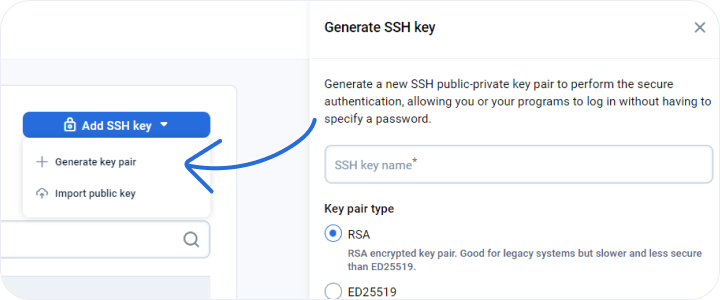
Page navigation — click Company → Settings → Security → ADD SSH KEY → Generate key pair.
You can add a name for the SSH key, choose a meaningful name like KPAndroidKubernetesED or KPAndroidKubernetesRSA. You need to select an encryption type like RSA or ED25519 and then click GENERATE KEY PAIR.
After downloading the private key, you may need to apply specific permissions:
Run this command: chmod 600 [private_key_filename]
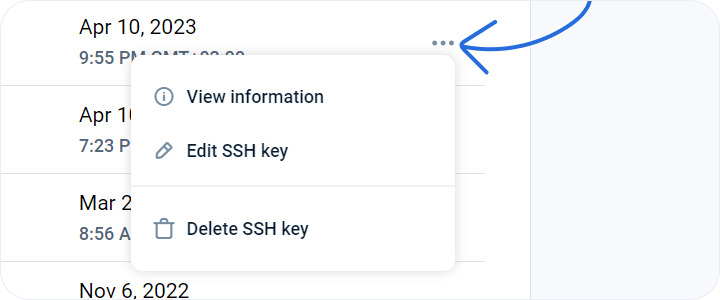
View info, edit and delete the SSH key
Page navigation — click Company → Settings → Security to see the list of all the SSH keys. Click the ellipsis (…) on the right of each key to see the dropdown menu.
You can edit the key name by clicking Edit SSH key. You can delete the SSH key by clicking Delete SSH key.
How to connect to a virtual machine using the SSH key?
If you have used emma for key generation, the public key is already placed on the server and the private key is available for you to download. The public key is placed in the authorized_keys file on your server in the hidden ~/.ssh folder.
Navigate to the folder with the key: cd C:\Users\<username>\Downloads
Connect to your server using the private key:
ssh -i <keyName>.pem <username-associated-with-your-server>@<server-public-IP-address>Example with real values: ssh -i skgMLTrainVMApr20EDkp.pem [email protected]
Navigate to the folder with the key: cd ~/Downloads
Connect to your server using the private key:
ssh -i <keyName>.pem <username-associated-with-your-server>@<server-public-IP-address>Example with real values: ssh -i skgMLTrainVMApr20EDkp.pem [email protected]
Navigate to the folder with the key: cd ~/Downloads
Connect to your server using the private key:
ssh -i <keyName>.pem <username-associated-with-your-server>@<server-public-IP-address>Example with real values: ssh -i skgMLTrainVMApr20EDkp.pem [email protected]
Last updated on 1 Aug 2026